

Appearance
Skip to content
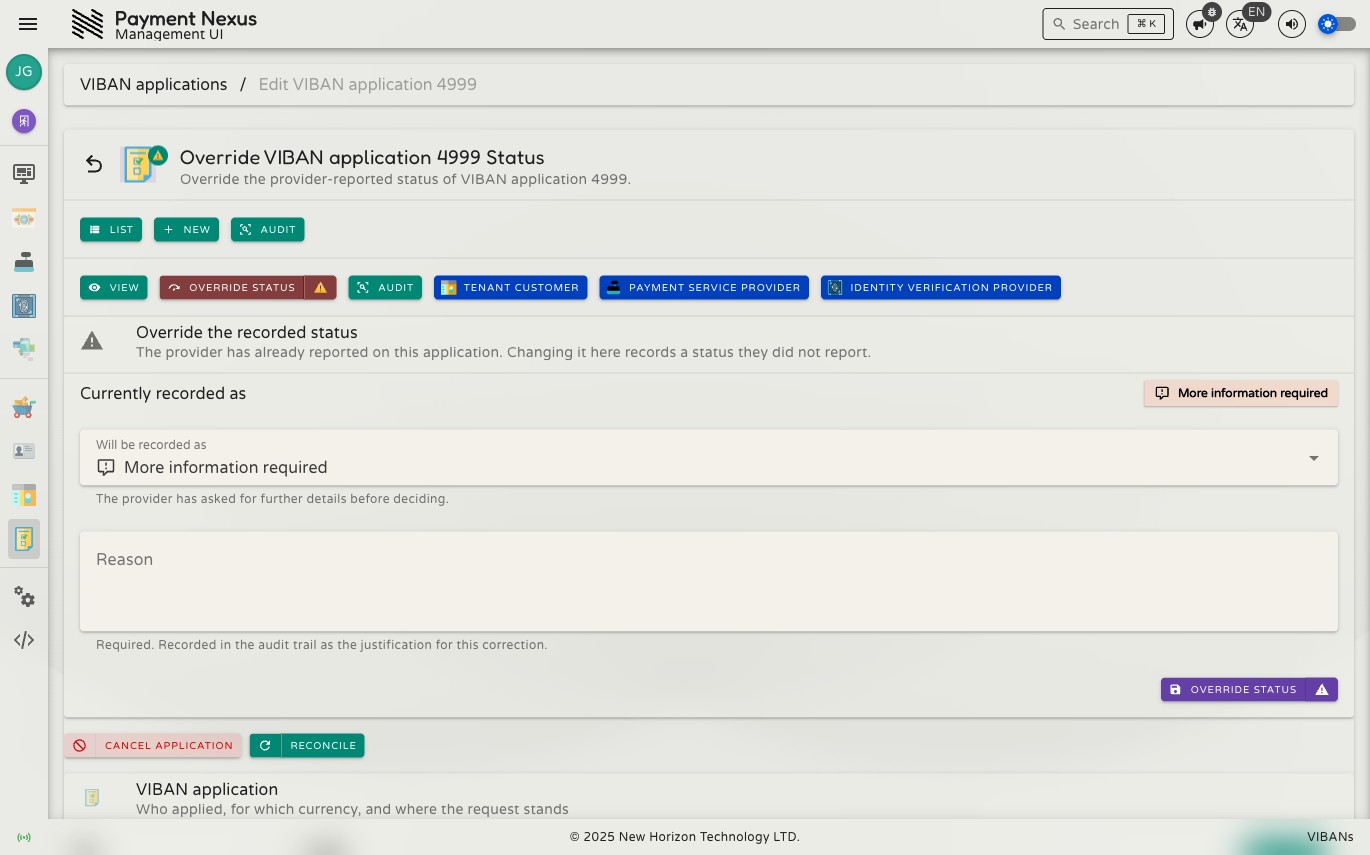
Correcting & Managing a VIBAN Application
You can perform three different actions on the manage page for an application. Use each action for a specific situation.
Permissions
| Action | Permission required |
|---|---|
| Correct the status of a non-vendor-reported application | viban_application:disposition |
| Override a status the provider has already reported | viban_application:disposition:override |
| Cancel an application | viban_application:cancel |
| Reconcile against the provider | viban_application:reconcile |
Correct / Override status
Use this action to set the status manually. Select the new status in Will be recorded as and enter a Reason. The reason is always required and is saved in the audit log.
If the provider already sent a result for this application, changing the status here replaces that provider result. This requires the viban_application:disposition:override permission.
This does not issue an account
Changing the status to Approved here only updates the record in Payment Nexus. It does not contact the provider and does not create a real account. Use this action only to fix the record in Payment Nexus if it does not match what the provider decided. Do not use it to force account creation.
Cancel
Stops an active application — for example, if someone submitted a duplicate application. You can only cancel an application if it has not reached a final status.
Cancel vs. correcting the status
Cancel stops an application that is still in progress. Correct/Override status changes the saved result of an application that already finished. Do not use Cancel if the provider already made a decision, and do not override the status if the application is still waiting for a decision. Make sure you select the right action before you proceed.
Reconcile
Checks the application status with the provider again and shows whether anything changed. Use this action if you think the record in Payment Nexus is out of date — for example, if the system missed a notification from the provider.
Reconcile returns a simple success or failure result instead of an HTTP error code. If a provider does not support reconciliation, the system explains that this feature is unavailable. If a check fails, the system displays an error message. In all cases, the application status changes only if the provider reports a different status.