

Appearance
Skip to content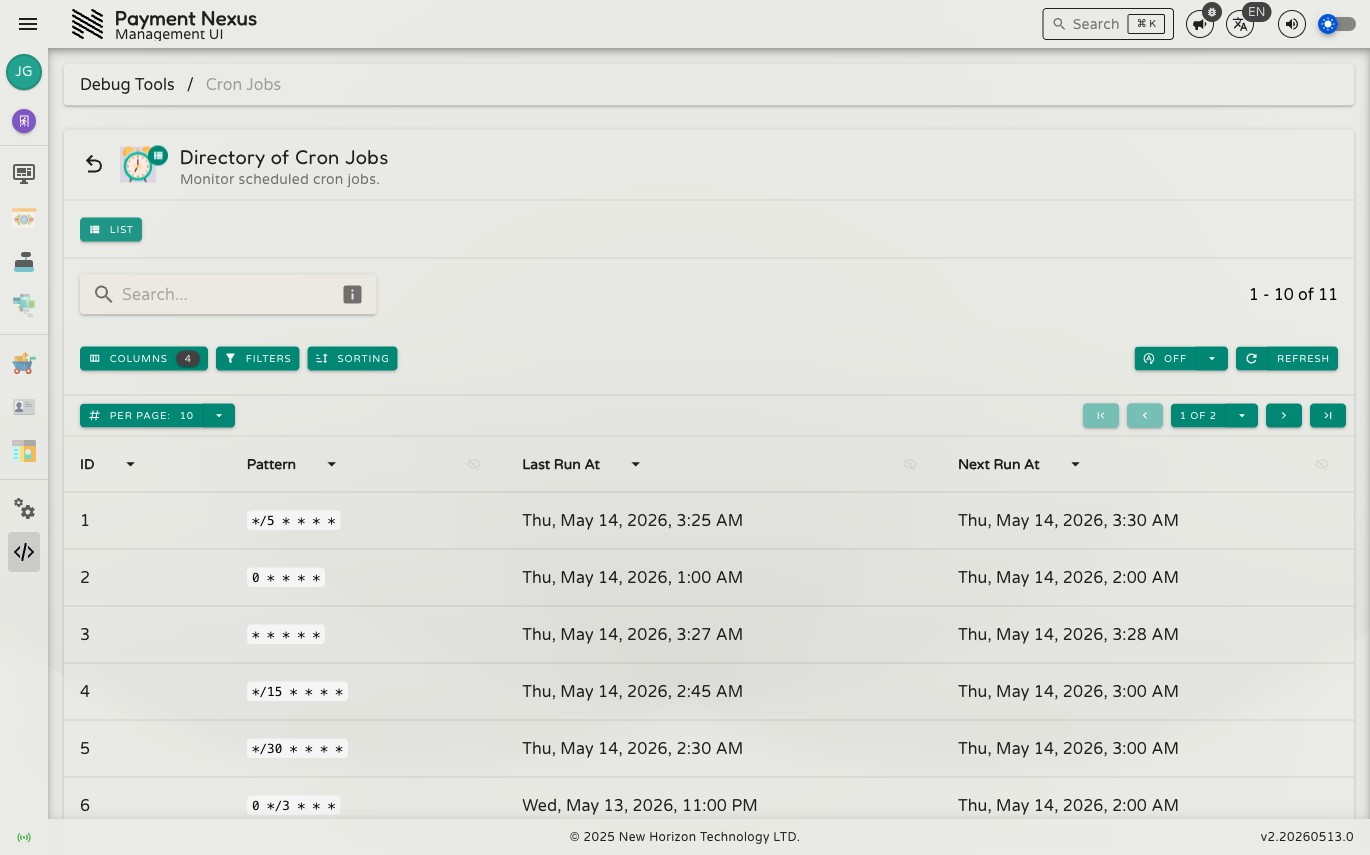
Cron Jobs
The Cron Jobs page lists every scheduled background job registered in Payment Nexus. Use it to confirm that recurring tasks are firing on time or to investigate a job that appears overdue.
Each job runs exactly once per interval, even when multiple instances of Payment Nexus are running simultaneously.
Permissions
| Action | Permission required |
|---|---|
| View cron job status | crons:monitor + application:administer |
What is shown
The directory is searchable, filterable, sortable, and exportable. Each row represents a registered job:
| Column | Description |
|---|---|
| ID | Internal numeric identifier for the job |
| Pattern | Standard 5-field cron expression controlling when the job fires |
| Last Run At | Timestamp of the most recent execution |
| Next Run At | Timestamp of the next scheduled execution |
Jobs are read-only — there are no manual trigger or enable/disable controls. Schedule changes are made at the application configuration level.
TIP
If Next Run At is significantly in the past, the job may be stuck or the scheduler may have restarted without recovering its state. Compare it against Last Run At to gauge how overdue the job is.
Registered jobs
Payment Nexus registers 14 cron jobs at startup. The majority are tiered reconciliation jobs — they ensure that Payment Intent Tickets are kept in sync with PSPs and CRMs. Older tickets are checked less frequently:
| Pattern | Purpose |
|---|---|
* * * * * | Reconcile tickets from the last 5 minutes |
*/5 * * * * | Reconcile tickets from 5–15 minutes ago |
*/5 * * * * | Update currency exchange rates |
*/15 * * * * | Reconcile tickets from 15–30 minutes ago |
*/15 * * * * | Force CRM reconciliation for all tickets from the last 3 hours |
*/30 * * * * | Reconcile tickets from 30 minutes–1 hour ago |
0 * * * * | Reconcile tickets from 1–3 hours ago |
0 */3 * * * | Reconcile tickets from 3–6 hours ago |
0 */6 * * * | Reconcile tickets from 6–18 hours ago |
0 */12 * * * | Reconcile tickets from 18–36 hours ago |
0 0 * * * | Reconcile tickets from 1–3 days ago |
0 0 * * 0 | Reconcile tickets from 3–21 days ago |
0 0 1 * * | Reconcile tickets from 21 days–3 months ago |
The reconciliation jobs work by re-querying the PSP and CRM for the latest payment status and updating tickets accordingly. Recent tickets are checked frequently because they are most likely to change; older tickets are checked just often enough to catch any delayed callbacks or retries.