

Appearance
Skip to content
Viewing a Payment Intent Ticket
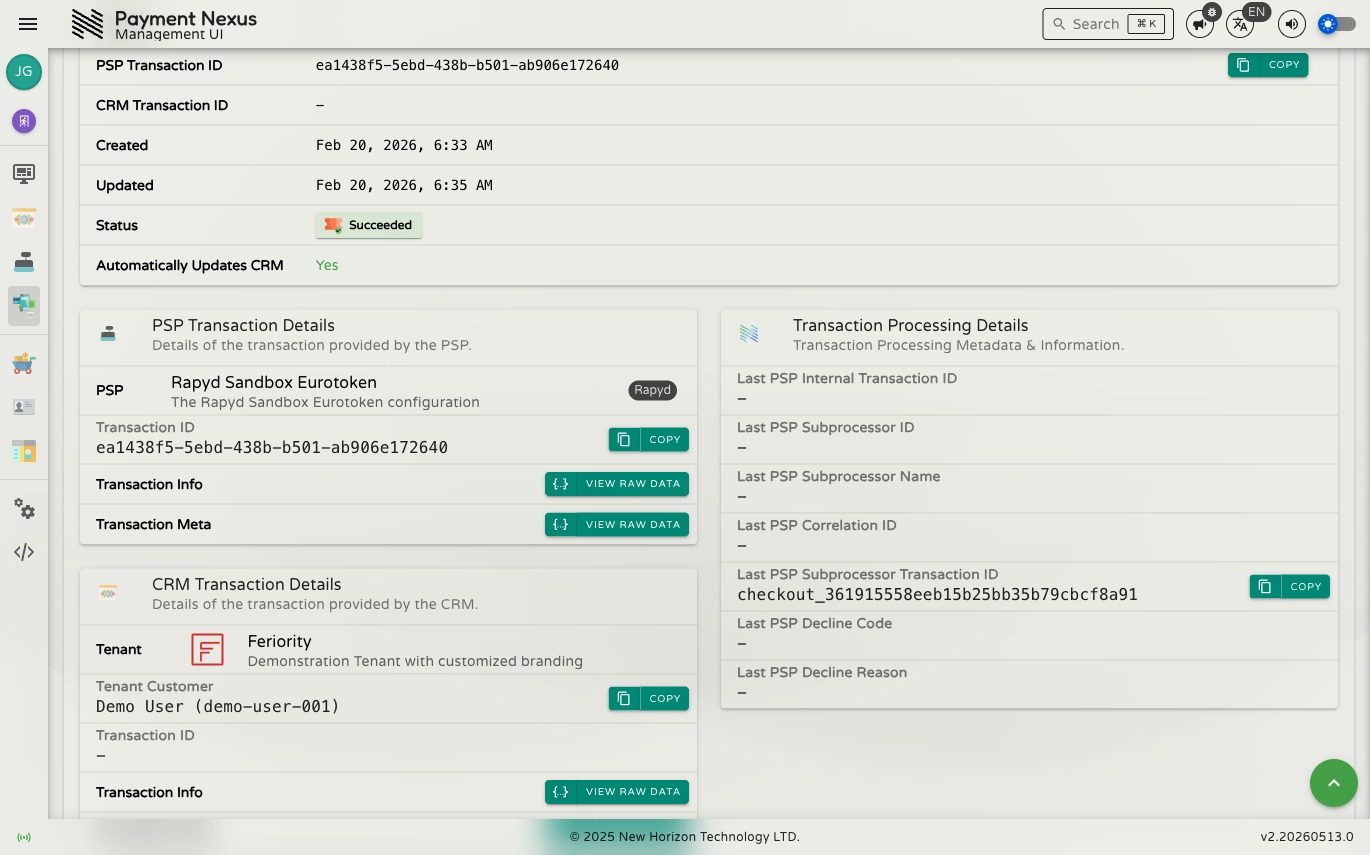
The PIT detail page shows everything Payment Nexus knows about a payment in one place. It is split into four sections plus a toolbar of available actions.
Permissions
| Action | Permission required |
|---|---|
| View a ticket | payment_intent_ticket:read |
| View PSP transaction data | payment_intent_ticket:read:psp |
| View CRM transaction data | payment_intent_ticket:read:crm |
| Download proof of payment | payment_intent_ticket:read:pii |
Detail Toolbar
The toolbar runs across the top of the detail page. The actions shown depend on the ticket's current status and your permissions.
Primary actions:
| Action | When shown | Description |
|---|---|---|
| View | Always | The default read-only detail view. |
| Disposition | Ticket has not yet reached a final status | Manually set the outcome of the payment. See Dispositioning. |
| Override Disposition | Ticket is succeeded or canceled | Change the outcome of a ticket that has already been resolved. See Dispositioning. |
| Advanced | Always | Edit the advanced settings for this ticket. See Advanced Settings. |
| Audit | Always | View the full audit log of changes to this ticket. |
| Refresh from PSP | When the PSP supports it | Re-fetches the latest transaction state from the PSP and updates the ticket. Requires a confirmation step. |
Disposition vs Override Disposition
Only one of these is ever shown at a time — which one depends on whether the ticket has already been resolved.
Navigation links (shown in a secondary group, or in a More overflow menu depending on screen width):
| Link | When shown | Navigates to |
|---|---|---|
| Checkout Intent Ticket | Only when the PIT was created from a checkout session | The checkout session that initiated this payment |
| Payment Service Provider | Always | The PSP record |
| Tenant | Always | The brand record |
| Tenant Customer | Always | The customer record associated with this payment |
Payment Intent Basics
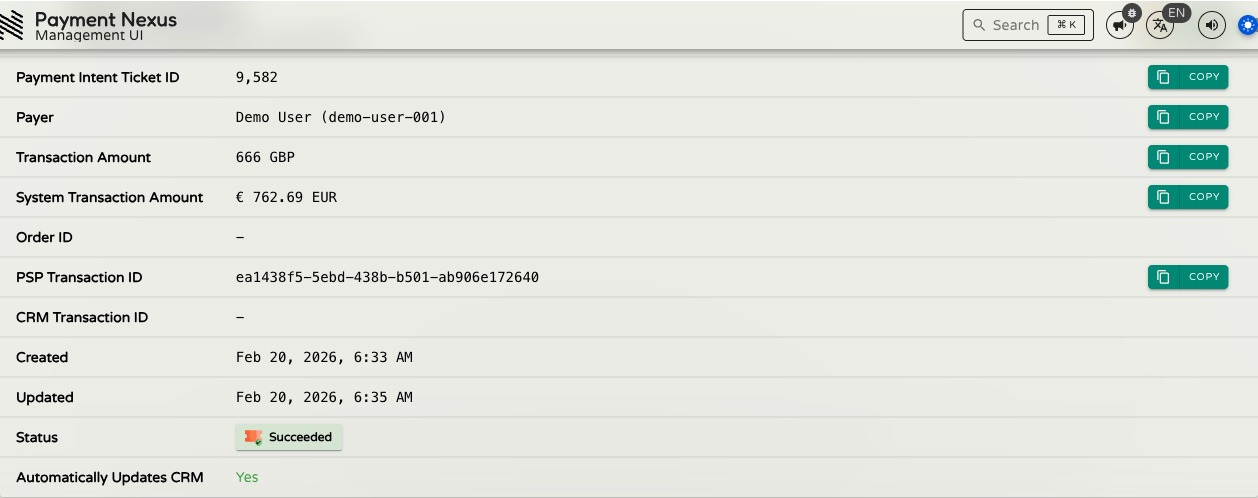
The Payment Intent Basics section shows the core details of the ticket.
| Field | Description |
|---|---|
| Payment Intent Ticket ID | The internal Payment Nexus identifier for this PIT. Copyable. |
| Payer | The tenant customer who initiated this payment, shown as Name (ID). Copyable. |
| Transaction Amount | The amount and currency as originally submitted to the PSP — the amount in the customer's transaction currency. Copyable. |
| System Transaction Amount | The EUR equivalent of the transaction amount, converted at the exchange rate in effect when the payment was recorded. Always shown in EUR. This is the figure used in all volume and success rate metrics. Copyable. |
| Order ID | The order reference from the brand's system. Copyable when present. |
| PSP Transaction ID | The transaction identifier issued by the PSP. This is the primary reference for looking up the transaction at the provider. Copyable when present. |
| CRM Transaction ID | The transaction reference used by the brand's CRM system. Copyable when present. |
| Created | When the PIT was first created. |
| Updated | When the PIT was last modified. |
| Status | The current lifecycle status, shown as a coloured chip. See Payment Intent Status Lifecycle for the full list of statuses and what they mean. |
| Automatically Updates CRM | Whether Payment Nexus will automatically notify the brand's CRM when this ticket's status changes. Shows Yes (green) by default. Shows No (red) when the ticket has been excluded via Advanced Settings. |
PSP Transaction Details
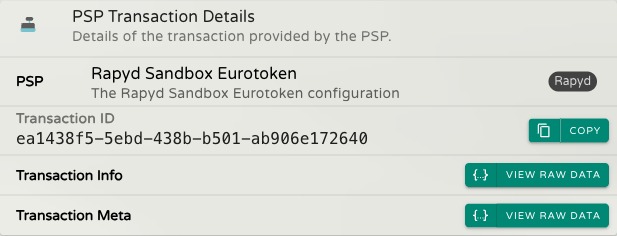
The PSP Transaction Details section shows the data received from the payment service provider about this transaction.
| Field | Description |
|---|---|
| PSP | The PSP that processed this payment. Click the card to navigate to the PSP record. |
| Transaction ID | The PSP's own transaction identifier — same value as PSP Transaction ID in the basics section. Copyable when present. |
| Transaction Info | Opens the data the PSP sent for this transaction (View Raw Data). Requires payment_intent_ticket:read:psp; the button is disabled if no data has been received. |
| Transaction Meta | Opens supplementary data from the PSP (View Raw Data). Requires payment_intent_ticket:read:psp; the button is disabled if no data has been received. |
Download Proof of Payment appears at the top of this section for wire transfer payments that have an uploaded evidence file attached. Requires payment_intent_ticket:read:pii.
Evidence files are not scanned for viruses or malware
Exercise caution when opening downloaded evidence files. If you are unsure about safe handling procedures, consult your IT department before proceeding.
CRM Transaction Details
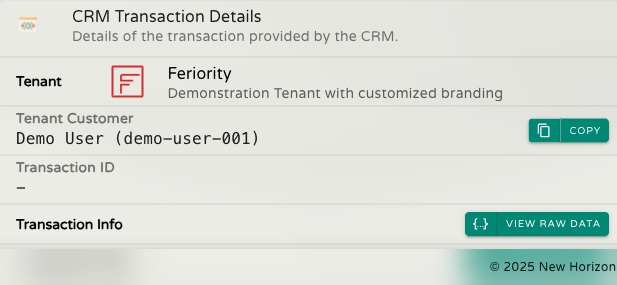
The CRM Transaction Details section shows the data exchanged with the brand's CRM about this payment.
| Field | Description |
|---|---|
| Tenant | The brand this payment belongs to. Click the card to navigate to the brand record. |
| Tenant Customer | The customer associated with this payment, shown as Name (ID). Copyable when present. |
| Transaction ID | The CRM's own transaction reference — same value as CRM Transaction ID in the basics section. Copyable when present. |
| Transaction Info | Opens the data the CRM sent for this transaction (View Raw Data). Requires payment_intent_ticket:read:crm; the button is disabled if no data has been received. |
| Transaction Meta | Opens supplementary data received from the CRM (View Raw Data). Requires payment_intent_ticket:read:crm; the button is disabled if no data has been received. |
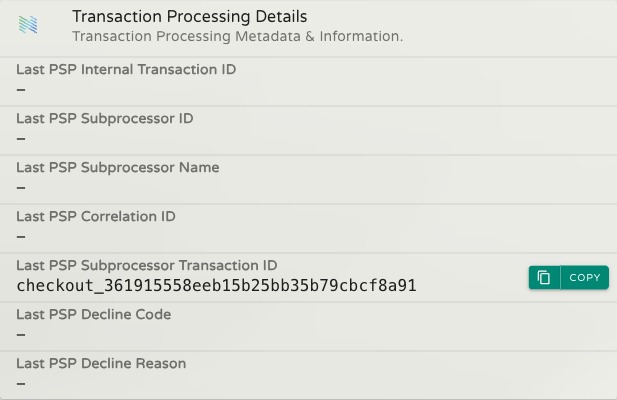
Transaction Processing Details
The Transaction Processing Details section shows identifiers from the PSP's processing of this payment. These fields are most useful when investigating a declined payment or working with the PSP to trace a specific transaction. Fields with data are copyable.
Field availability depends on the PSP
Not all PSPs provide all of these fields — some return a full set, others return only a subset or none at all. Empty fields simply mean the PSP did not supply that data for this transaction.
| Field | Description |
|---|---|
| Last PSP Internal Transaction ID | The PSP's internal reference for the final payment attempt. Distinct from the main PSP Transaction ID — use this when the PSP asks for an internal tracking reference. |
| Last PSP Subprocessor ID | The identifier of the underlying processor the PSP routed this payment through, if applicable. |
| Last PSP Subprocessor Name | The name of that underlying processor. |
| Last PSP Correlation ID | A reference the PSP uses to link its own records to those of the underlying processor. Useful when asking the PSP to trace a transaction on your behalf. |
| Last PSP Subprocessor Transaction ID | The underlying processor's own transaction reference. Use this when contacting the processor directly. |
| Last PSP Decline Code | A short code indicating why the payment was declined (e.g. insufficient_funds). Only present for declined payments. |
| Last PSP Decline Reason | A plain-text explanation of why the payment was declined. Only present for declined payments. |