

Appearance
Skip to content
Sorting
Directories can be sorted by one or more fields to control the order records appear in — useful when you need to find the most recent activity, surface the largest transactions, or work through records in a consistent sequence.
Sorting from a Column Header
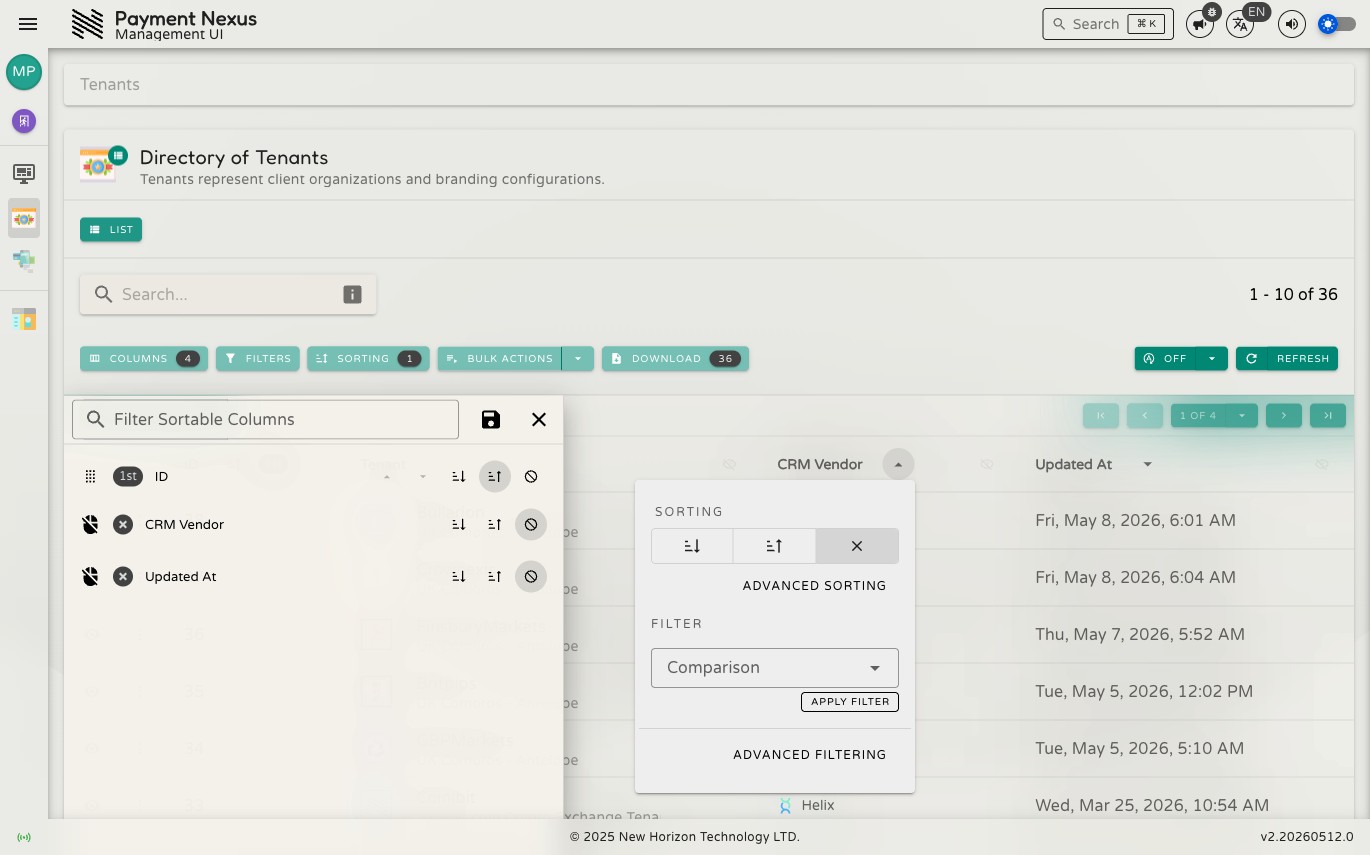
Click the sort button on any sortable column header to open a quick panel for that column:
The panel lets you sort the column ascending or descending, clear the sort, or jump to the full sort drawer for that column. Not all columns support sorting — the sort button only appears on sortable ones.
Sort Drawer
For multi-field sorting, open the Sorting drawer from the toolbar. Here you can add multiple sort fields, set the direction for each, and control priority — records are sorted by the first field first, then by subsequent fields to break ties.
Click Save to apply or Discard to abandon changes.
Sort State in the URL
Like filters, your sort configuration is encoded in the page URL — bookmark or share a sorted view and it will open with the same ordering applied, subject to the recipient's access permissions.