

Appearance
Skip to content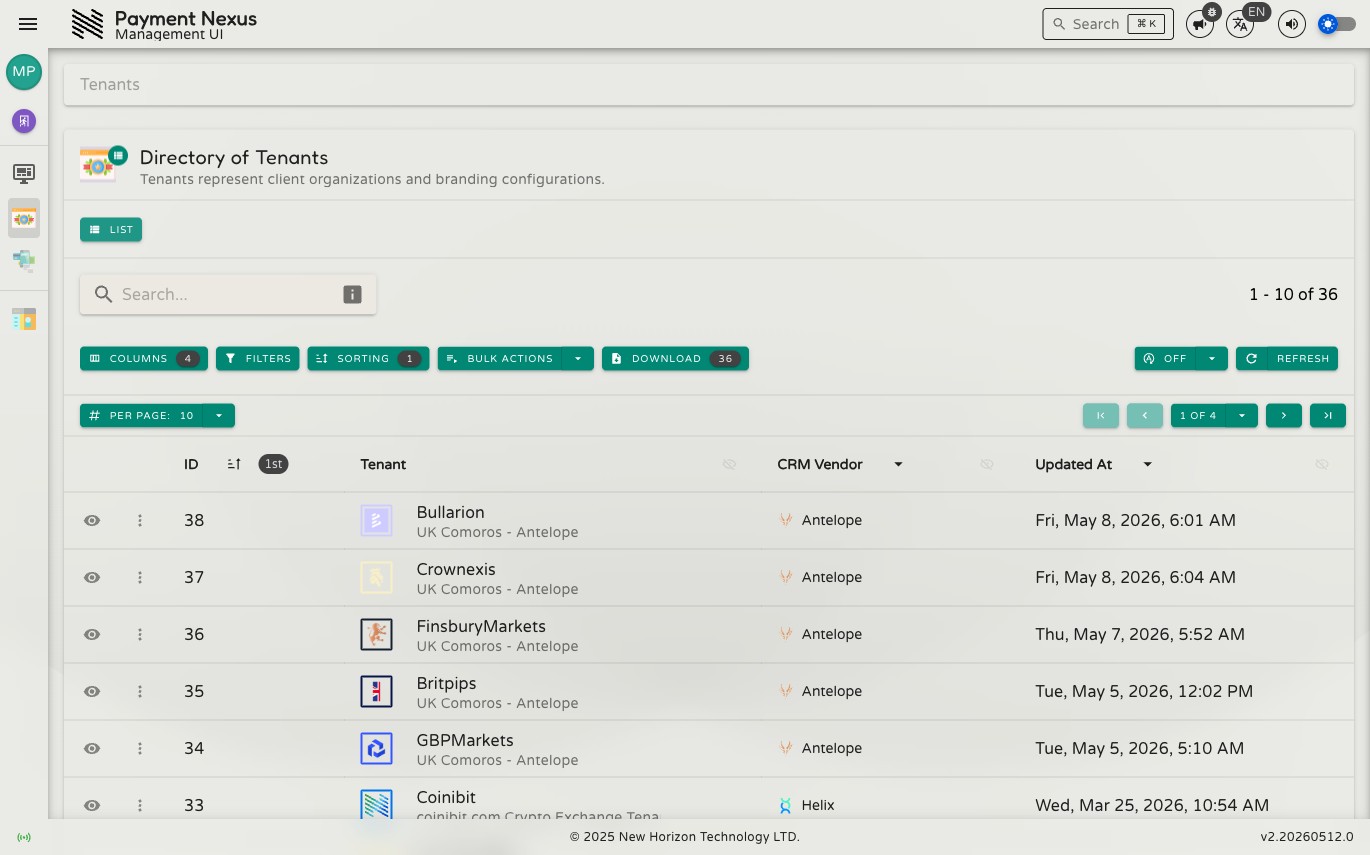
Directories
A directory is any list-based module page in the Payment Nexus management portal — Tenants, Payment Intent Tickets, and so on. Every directory shares the same set of tools for finding, viewing, and acting on records.
Layout
A directory page is made up of three main areas:
- Toolbar: Contains the search field, filter/sort/column controls, bulk actions, export, and refresh.
- Table: Displays the records matching your current search and filters. Columns, sorting, and row actions are all managed here.
- Pagination bar: Shows the total record count and lets you move between pages and adjust how many records appear per page.
In This Section
| Page | What it covers |
|---|---|
| Searching & Filtering | Search field, filter builder, saving filter state |
| Power Search | Raw Lucene query syntax for advanced filtering |
| Sorting | Column sorting, multi-field sort drawer |
| Columns | Showing, hiding, and reordering columns |
| Results & Pagination | Page size, navigation, totals, aggregations, auto-refresh |
| Row Actions | Per-record actions, context menu, opening in new tab |
| Bulk Actions | Multi-record operations, bulk update form |
| Exporting | Downloading records to a file |