

Appearance
Skip to content
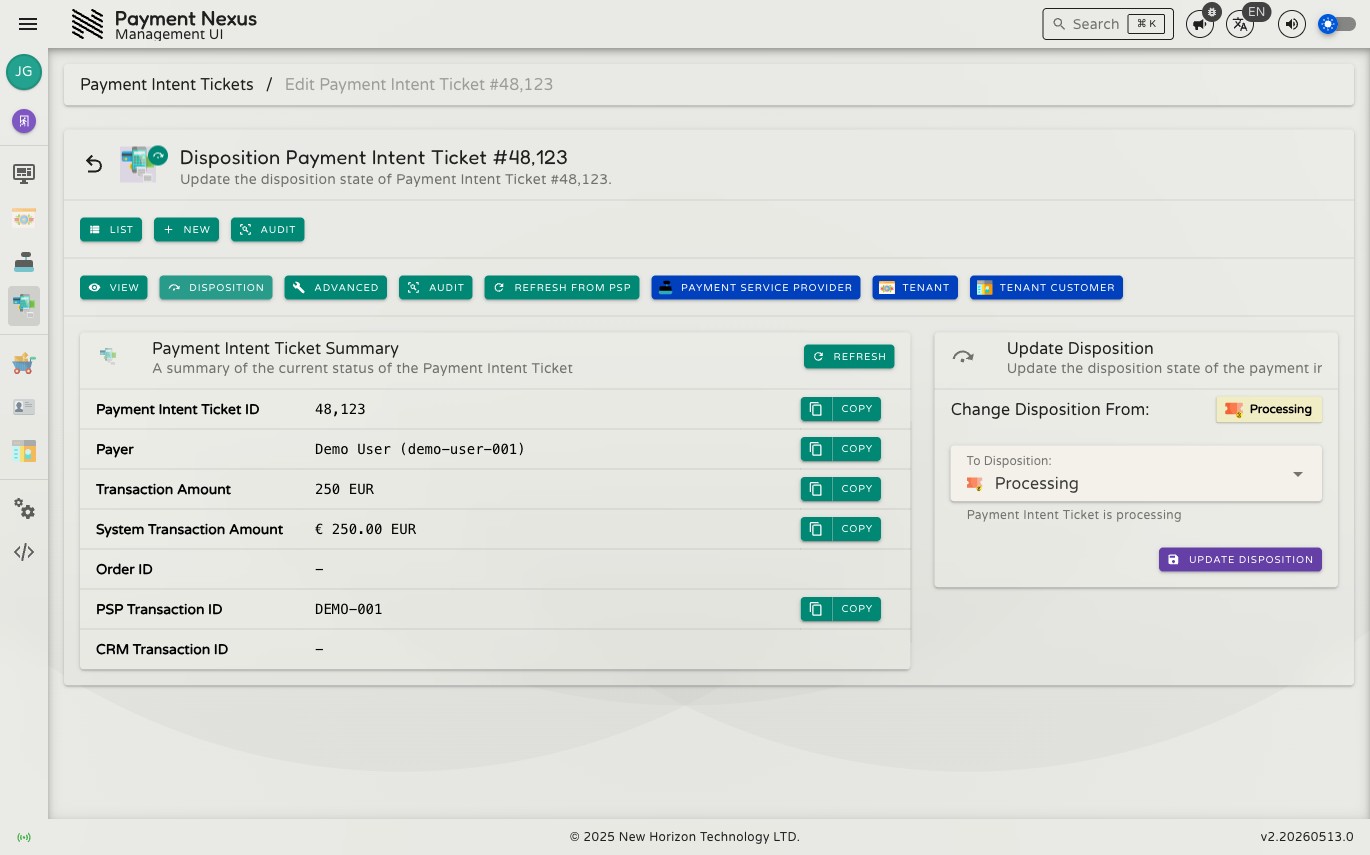
Dispositioning
Dispositioning is the act of manually setting the outcome of a Payment Intent Ticket. It is used when a payment needs to be resolved without waiting for an automated PSP response — for example, confirming a payment was received outside the system, or correcting a ticket that was resolved incorrectly.
There are two forms of dispositioning, each with different permissions and constraints.
Permissions
| Action | Permission required |
|---|---|
| Disposition a non-terminal ticket | payment_intent_ticket:disposition |
| Override a terminal ticket | payment_intent_ticket:disposition:override |
Disposition (non-terminal tickets)
When a PIT is in a non-terminal status — anything other than succeeded or canceled — you can set its final outcome manually. This is available from both the directory row actions and the detail page toolbar.
Click Disposition to open the form. It shows the ticket's current status and a dropdown to choose the target disposition:
| Disposition | Effect |
|---|---|
| Succeeded | Mark the payment as completed. The PIT moves to succeeded and will contribute to success rate and volume metrics. |
| Canceled | Mark the payment as not completed. The PIT moves to canceled — a terminal non-success state. |
Select the desired outcome and click Update Disposition. The change takes effect immediately and is recorded in the audit log.
Disposition is final for the current status
Once a ticket reaches succeeded or canceled, the regular disposition form is no longer available. Correcting a terminal ticket requires Override Disposition.
Disposition Override (terminal tickets)
When a PIT has already reached a terminal status (succeeded or canceled), changing its outcome requires the override form. This requires elevated permission (payment_intent_ticket:disposition:override).
Click Override Disposition to open the form. It shows the ticket's current terminal status and the same dropdown to choose the new outcome. The override allows switching a succeeded ticket to cancelled, or a cancelled ticket back to succeeded.
Click Update Disposition to apply the override. As with regular dispositioning, the change takes effect immediately and is recorded in the audit log.
Read-only mode
If you have payment_intent_ticket:read but lack the disposition or override permission, the detail page shows View as the active mode. The disposition and override links are hidden — you can inspect the current status but cannot change it.
The directory row action is also hidden. The row will show only View and Audit as pinned actions, with the overflow menu containing the navigation links (View PSP, View Tenant, etc.).
Auditing
Every disposition and override is recorded in the ticket's audit log. The audit entry captures:
- The previous status
- The new status
- The user who made the change
- The timestamp
Click Audit on the detail toolbar or row action to review the full history.