

Appearance
Skip to content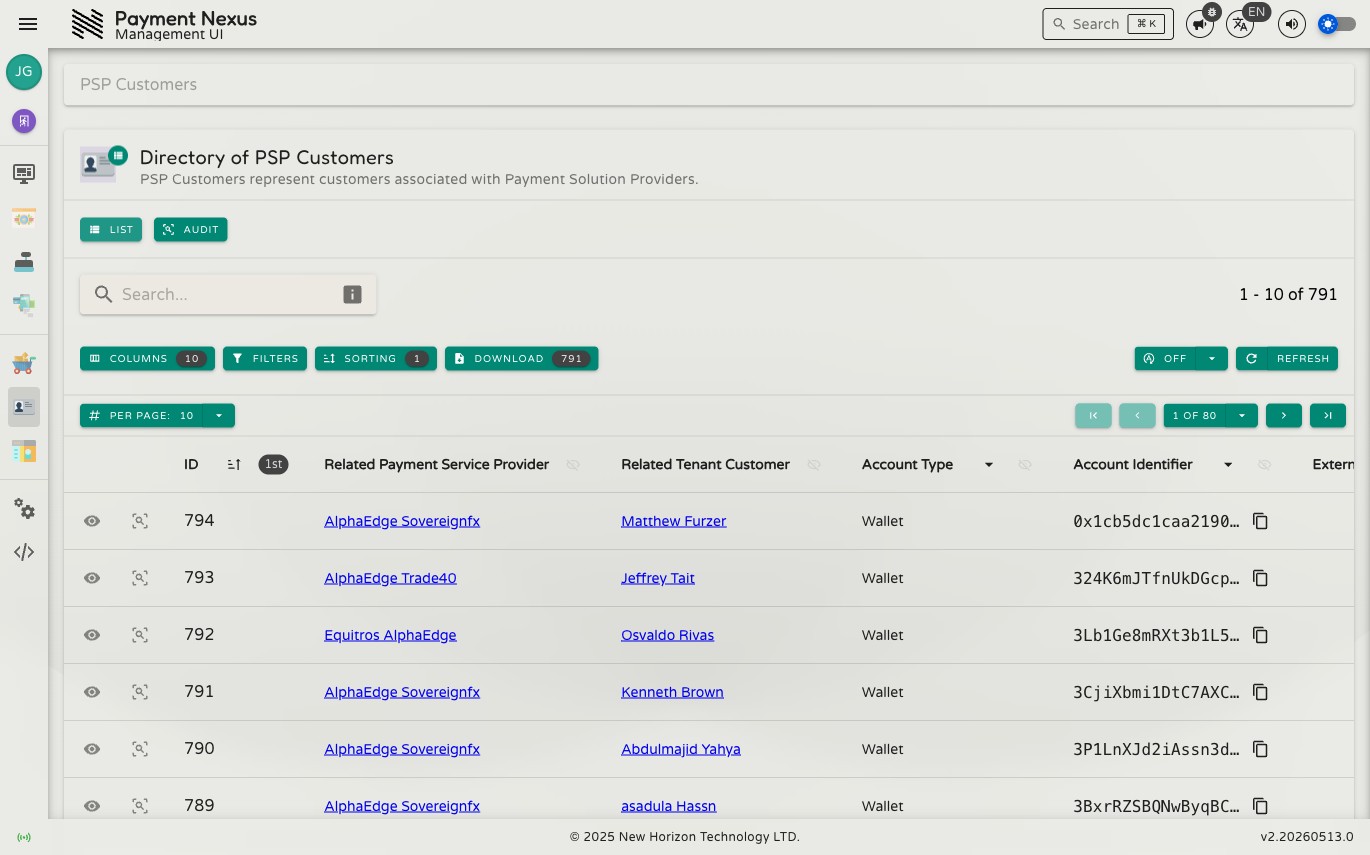
The PSP Customer Accounts Module
A PSP Customer Account is a provider-issued account held on behalf of a customer — for example a virtual IBAN, a crypto wallet address, or a stored payment token. When a PSP creates an account for a customer (such as assigning them a deposit address), Payment Nexus records it here and links it to both the customer and the PSP.
VIBAN accounts issued through the VIBAN Applications module appear in this same directory alongside every other account type — a VIBAN is simply a PSP customer account with bank_account for its Account Type.
PSP Customer Accounts are created by the PSP integration. Their identity — the PSP, the tenant customer, the account type and identifier — can't be changed from the portal. Everything else (Label, Account Tag, Description, Status, Expires At, External Reference ID, and Metadata) can be edited on Editing a PSP Customer Account. See Viewing a PSP Customer Account for the Reconcile and Revoke actions available on VIBAN accounts.
Permissions
| Action | Permission required |
|---|---|
| List accounts | psp_customer_account:list |
| View an account | psp_customer_account:read |
| View audit trail | psp_customer_account:audit |
Directory
The PSP Customer Accounts directory is searchable, filterable, sortable, and exportable. It supports all standard directory features including the filter builder, power search, and column customisation. See the Directories section for full details on these shared capabilities.
Default columns
| Column | Description |
|---|---|
| ID | Internal Payment Nexus identifier for this account |
| Payment Service Provider | The PSP that issued this account |
| Tenant Customer | The customer this account belongs to |
| Account Type | The type of account (e.g. Wallet, IBAN) |
| Account Identifier | The account address or reference issued by the PSP — for example a crypto wallet address or virtual IBAN. Copyable. |
| External Reference ID | An additional reference from the PSP, if provided. Copyable. |
| Currency | The currency this account is denominated in |
| Label | A short name for the account |
| Description | A longer description of the account |
| Status | The current status of the account (e.g. Active) |
Row actions
Each row has two pinned actions:
| Action | Description |
|---|---|
| View | Open the full account detail page |
| Audit | View the audit history for this account |
Viewing an Account
Clicking View on any row opens the account detail page. See Viewing a PSP Customer Account for a full breakdown of every field.